
People use 2D animation to make engaging characters, cartoons, books, graphics, and tons of other stuff. You can learn the basics easily and start your own animation.
In this comprehensive guide, we'll check out what 2D animation is, how people use it, job options, how to begin, the good and bad parts, and what's coming next in the future for this cool art type.
If you want to be a 2D animator or just want to learn about it, read on to discover everything you need to know about 2D animation.
1. What is 2D Animation?
It's pretty straightforward, just like its name says. It's all about making characters, creatures, special effects, backgrounds, objects and more on a flat surface. The characters and scenes have height and width. (No depth, just like a drawing or painting)
Animators make a bunch of drawings, each one different from the last. When these drawings are shown one after another rapidly, they bring characters and stories to life.
Think about your favorite cartoons like "Mickey Mouse" or "The Simpsons." These are all types of 2D animation where artists use their skills to make drawings move, talk, and entertain us.
2. Where is 2d Animation Used?
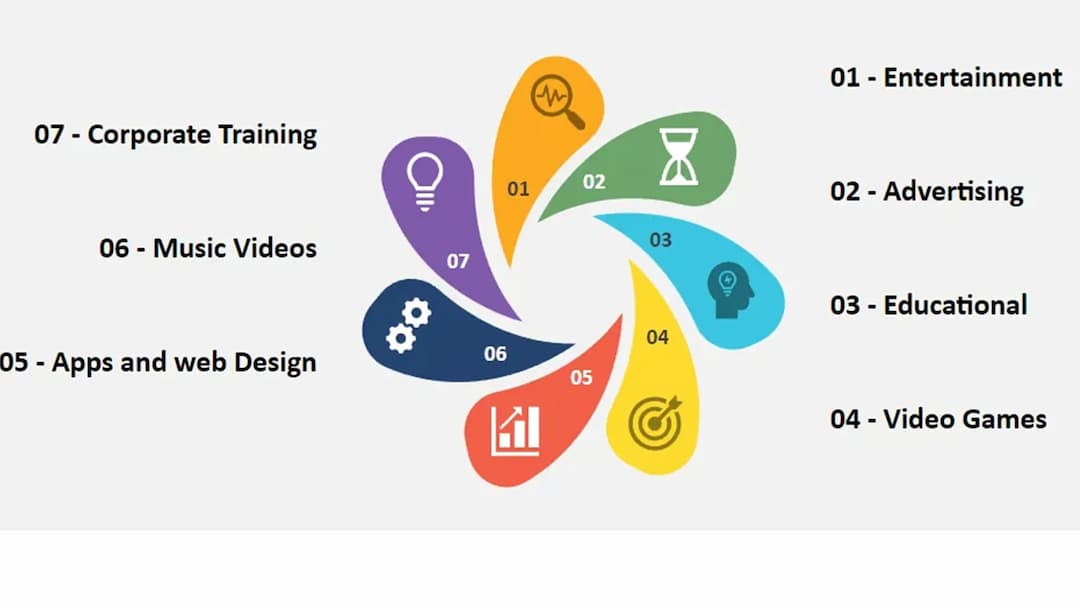
Entertainment
- Cartoons and TV shows (like "Mickey Mouse" and "The Simpsons")
- Animated films (such as "The Lion King" and "Aladdin")
- Web series and online cartoons
- Animated TV ads
- Videos to explain products
- Stuff for social media
- Books for school
- Cartoons and videos to teach kids
- Online classes and how-to guides
- Apps to help you learn
- Moving characters
- Game worlds and scenery
- Story parts between gameplay
- Moving parts in apps
- Moving pictures on websites
- Animations in how you use things
- Music videos with animation
- Videos with moving words and pictures to go with songs
- Videos and lessons to train employees
- Presentations and infographics that move
3. What is the History of 2d Animation?
2D animation traces its roots back to the late 1800s, when pioneers like Émile Reynaud and Émile Cohl captivated audiences with simple yet magical moving pictures projected onto screens.
In the 1920s, the medium took a giant leap forward with the debut of Mickey Mouse in Walt Disney’s "Steamboat Willie" — one of the first cartoons to feature perfectly synchronized sound. It was a true game-changer for animation.
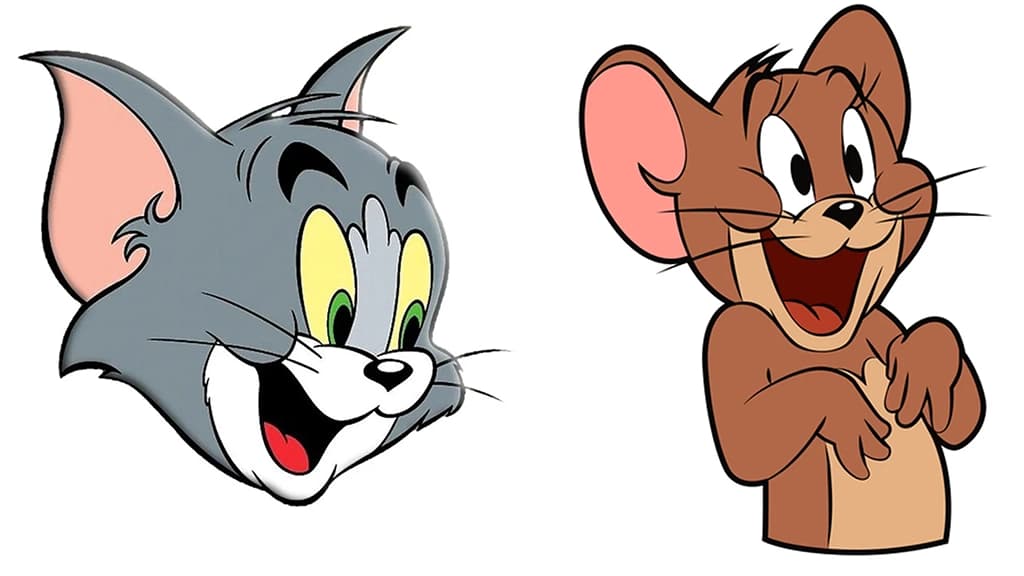
The 1930s and 1940s ushered in a golden era, with cinematic masterpieces like "Snow White and the Seven Dwarfs" and enduring series such as Looney Tunes and Tom and Jerry capturing hearts across generations.
From the 1950s to the 1980s, television became the prime stage for animation. Studios like Hanna-Barbera delivered iconic hits such as The Flintstones, delighting families worldwide. By the 1990s, the rise of computers transformed the industry — tools like Adobe Flash empowered a new wave of independent creators to bring their visions to life.
Today, 2D animation continues to thrive. Streaming platforms have made it more accessible than ever, while modern techniques blend the timeless appeal of hand-drawn art with the possibilities of digital innovation — ensuring the craft stays vibrant and relevant.
4. Is it Beginner-Friendly?
It's simple to learn, doesn't cost much, and you can make it without too much trouble. With a few weeks of practice, you can get the hang of it. But remember, it still takes time to become good at it.
In just a few weeks, you might be able to make small 2D animations. You might even get a job as a freelancer.
5. How to Learn 2D Animation
a) Self-Practice:
b) Online Courses:
c) YouTube Tutorials:
6. How to Create 2D Animation
a) What you need
- Animation Programs (like Adobe Animate or Toon Boom Harmony)
- Tools to Draw (tablet for drawing, pencil, paper)
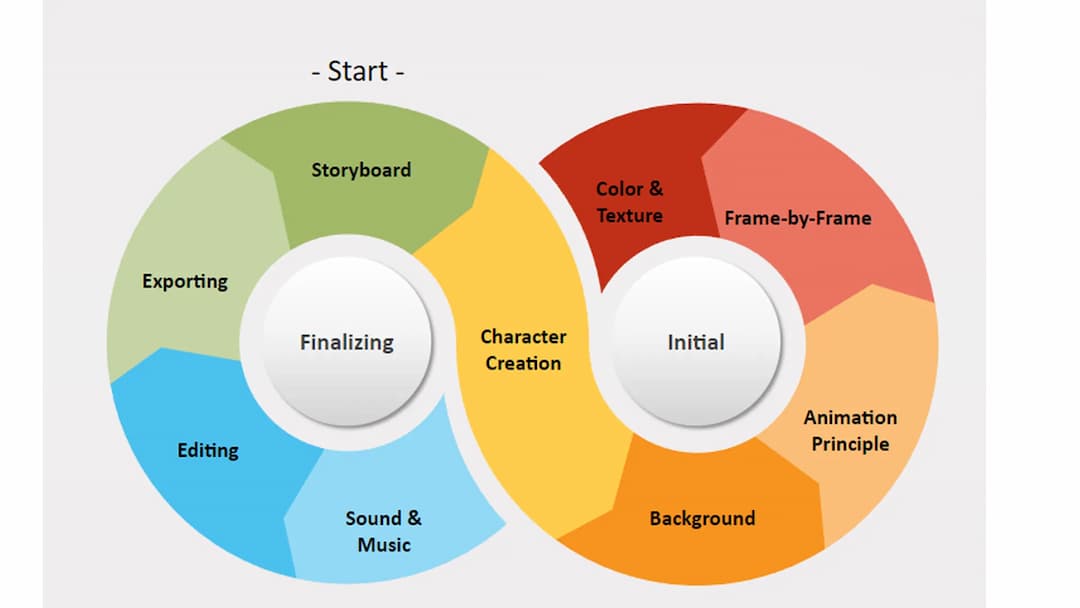
- Storyboard (to plan out your scenes)
- Making Characters (coming up with and finishing your characters)
- Making Backgrounds (creating the places where stuff happens)
- Animation Basics (getting the timing right, making things stretch and squish, setting up what's coming next)
- Sound and Music (adding cool noises and tunes)
b) Process
- Make a Storyboard: Sketch out your story, scenes, and what happens in each part.
- Build Characters: Come up with characters that have cool expressions, moves, and personalities.
- Set the Scene: Draw backgrounds that fit your story and characters.
- Use Animation Tricks: Add stuff like good timing, squashing and stretching, and build-up to make it look real.
- Draw Frame by Frame: Bring your storyboard and characters to life by drawing each picture one at a time.
- Add Color and Texture: Make it look better by coloring it in and adding some cool details.
- Put in Sounds and Music: Add noises and tunes that match what's happening in your animation.
- Putting it all together: Get your animation software to merge frames, sounds, and cool stuff into one awesome video.
- Saving your work: Pick how you want to save your animation - maybe as a video or a GIF - and then save it that way.
7. Best 2D Animation Software
To create amazing 2D animations, you’ll need a reliable partner — your 2D animation software. The internet is packed with options, but here are some of the best picks that are affordable, effective, and beginner-friendly:
- Adobe Animate: A professional-grade tool packed with features for both beginners and experts — perfect for creating interactive animations, web content, and more.
- Toon Boom Harmony: The go-to choice for major animation studios, offering advanced rigging, drawing, and production tools for top-tier results.
- Clip Studio Paint: Loved by illustrators and animators for its intuitive interface, high-quality drawing tools, and budget-friendly pricing.
- OpenToonz: A robust open-source animation program — famously used by Studio Ghibli — that’s completely free and great for all skill levels.
8. Benefits
- Easy to Change: You can make simple tweaks without starting over, which makes updates quick and simple.
- Easy to Learn and Use: 2D animation is straightforward, so both newbies and pros can use it to express their ideas without a big learning curve.
- Cheaper: 2D animation costs less than 3D animation. You don't need fancy, expensive software to do it.
- Less High-Tech: You don't need super-advanced tech or tools to make it work.
- Good for Feelings: It's great to show emotions and get ideas across.
- Quicker to Make: With fewer tech hurdles, you can often finish 2D animations faster than 3D ones.
- Shows Feelings and Stories: 2D cartoons are great at sharing emotions and personal tales through their basic artsy look.
- Lots of Uses: Perfect for cartoon TV shows, ad videos that explain stuff, and phone games where characters and stories matter most.
- Easy to Change: You can tweak 2D animations for print and websites, giving a similar brand feel across different places.
- Easy to Share: Simple and fun, 2D cartoons are just right for posting on social media and other sites helping, to reach more people and get them interested.
- Good bang for your buck: Even though 2D animations don't cost much, they often give you more than what you put in because you can use them in lots of ways and they grab people's attention.
- Easy for newbies: If you're just starting, 2D animation is a great way to begin your animation adventure. It's cheap and not too hard to learn the basics.
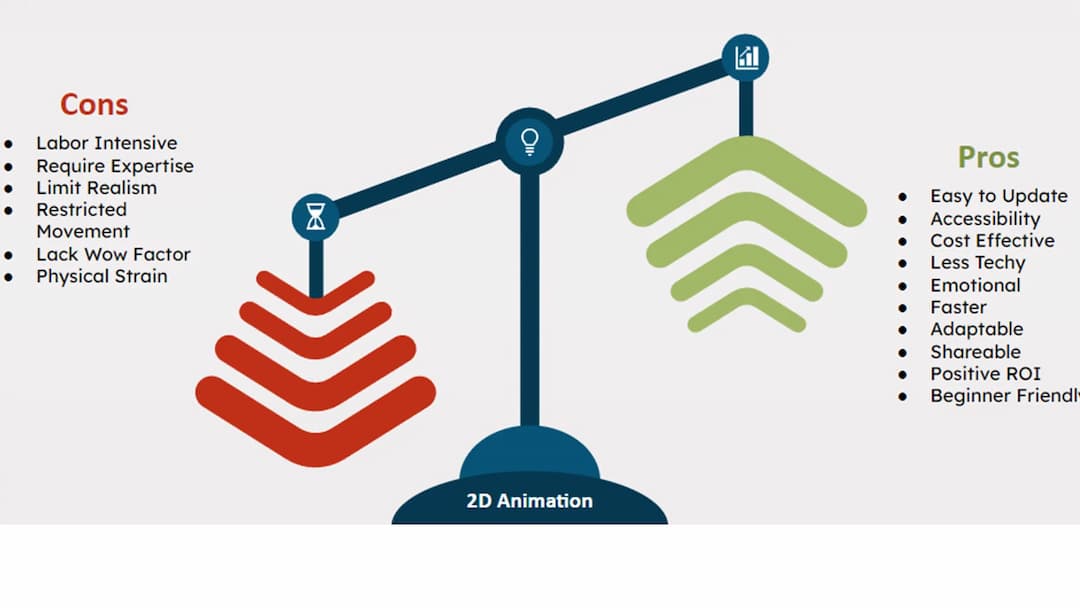
9. Drawbacks
- Takes a Lot of Work: Making 2D animation needs tons of manual effort. You gotta draw every single frame by hand.
- Hard to Master: Getting good at 2D animation takes ages. You need to put in a lot of time to learn the tricks and get comfortable with the software.
- Not as Deep or Real: 2D stuff looks less real or has the same depth as 3D animation. This can make it harder to get lost in the story.
- Limited Movement: The characters in 2D can't move as well as 3D ones. They're kinda stuck in their flat world.
- Costs a Bunch and Takes Forever: If you're doing old-school hand-drawn animation, be ready to shell out some serious cash and spend a ton of time on it.
- Not Flashy Enough: In today's world of fancy graphics, 2D cartoons might not wow people as much as cooler-looking 3D stuff.
- Seems Kinda Boring: Some folks might think 3D or other cartoon types are more fun to watch and lively.
- Body Aches: People who draw cartoons can get sore from always drawing and using computers for 2D animation.
- Can't Do Everything: While you can use it for a lot, 2D animation might not work for all projects, especially ones that need to look super real or have tiny details.
10. Career in 2D Animation
A career in 2D animation can be both exciting and rewarding for anyone passionate about bringing drawings to life. With dedication, creativity, and consistent practice, you can turn your artistic talent into a thriving profession that blends fun, storytelling, and innovation.
a) How to Start Your Career in 2D Animation:
- Do It Often: Get better by making short cartoons and trying out different looks.
- Show Your Stuff: Put your best work out there to catch the eye of clients and bosses.
- Know Your Tools: Get good at using popular programs like Adobe Animate and Toon Boom Harmony.
- Work for Small Companies: Gain experience and make a name for yourself by taking on little freelance jobs.
- Meet People: Talk to other animators and join online groups to find job chances.
b) Career Opportunities for 2D Animators:
- Character Animator: You can bring characters to life for TV programs, films, and video games.
- Storyboard Artist: You can map out and picture the order of animations in a video, film or cartoon.
- Illustrator: You can also draw characters, settings, and other parts.
- Animation Director: You can lead the animation work and guide the team.
- Motion Graphics Designer: You can make moving graphics for ads and online stuff.
- Freelance Animator: You can also do your own thing on different jobs.
- Educational Content Creator: You can make animations to teach and explain things.
- Game developer: You can create characters or backgrounds for 2D games.
- Graphics designer: You can also go for graphic designing if you're not into characters or elements.
11. Future of 2D Animation
12. Examples
- Mickey Mouse
- The Simpsons
- SpongeBob SquarePants
- Looney Tunes
- Tom and Jerry
- Adventure Time
- My Little Pony: Friendship is Magic
- Peppa Pig
- South Park
13. AI with 2D Animation
- AI is changing 2D animation. It speeds things up and makes it easier for more people to do.
- AI helps with boring stuff like drawing frames between key poses and adding color. This gives artists more time to tell cool stories.
- Artists now have AI tools to help them be more creative and make deeper stories.
- As AI and 2D animation work together, the future looks bright. We'll see more exciting and new things in this field.
FAQs of 2D Animation
Ans: 2D animation uses flat drawings or digital art to create movement. 3D animation adds an extra layer by making characters and backgrounds in a digital 3D space, making things look more real.
2. What do you need for 2D animation?
Ans: To make 2D animations, you need some animation software (like Adobe Animate or Toon Boom), tools to draw with (such as a graphics tablet or just pen and paper), and a solid grasp of animation basics like timing, spacing, and how things move.
3. Which is quicker, 2D or 3D animation?
Ans: In most cases, 2D animation takes less time to produce than 3D animation because it has fewer complicated steps and takes less time to render. However, how fast it goes can change based on how tricky the project is and how good the animator is at their job.